
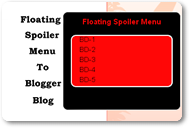
 Today,In this post we will talk about how to add floating spoiler menu to your blogger blog.After adding floating spoiler menu to blogger blog your readers can easily navigate your blog.When blog readers put their mouse pointer on the menu then menu will be automatically slide out.You can easily add and Floating Spoiler Menu just as easily removed.
Of course you will want to see how the floating spoiler menu looks on a blog so I have a preview or demo set up for you to have a look.
Also Read - Slide Out Social Bookmarking Gadget With JQuery For Blogger
Floating Spoiler Menu Demo Below
Advantages For Adding This "Floating Spoiler Menu"
If your blog look is more attractive and different, then this is clear that readers will spend more time on your blog,your blog's page views will increase and the ads displayed on your blog their CTR rate will also increases.
Many times readers won't focus on top menu, But this menu scrolls along with page and when user hovers on it then full menu will come out.
How to Add Floating Menu To Blogger Blog
- Go to Blogger Dashboard
- Click On "Design (Layout In The New Blogger Interface) - Page Elements"
- Click On "Add a Gadget" Select "HTML/Javascript" Widget
- Copy The Below Code and Paste It
<style text-type="CSS">
#bdmenu{
position:fixed;
right:5px;
center:0px;
background-color:#000;
border-radius:10px;
-moz-border-radius:10px;
border:1px solid #FFF;
width:202px;
height:20px;
color:#FF0606;
transition:all .5s ease-in;-moz-transition:all .5s ease-in;-webkit-transition:all .5s ease-in;-o-transition:all .5s ease-in;z-index:3;overflow:hidden;padding:9px 15px 10px;}
#bdmenu h3{
margin:0;
padding:0;
text-align:center;
cursor:pointer;}
#bdmenu ul{
border-radius:10px;-moz-border-radius:10px;
border:2px solid #FFf;
background-color:#FF0606;
margin:15px 0;
padding:0 15px;}
#bdmenu li{list-style:none;margin:0 0 5px;padding:0;} #bdmenu li a{
color:#000;
text-decoration:none;
font-size:14px;}
#bdmenu li a:hover{
color:#fff;}
#bdmenu:hover{
z-index:5;
height:175px;
</style>
<div id="bdmenu">
<h3>
TITLE</h3>
<ul>
<li><a href="#">BD-1</a></li>
<li><a href="#">BD-2</a></li>
<li><a href="#">BD-3</a></li>
<li><a href="#">BD-4</a></li>
<li><a href="#">BD-5</a></li>
</ul>
</div>
Customization
Red - The Position Of Floating Spoiler Menu (means The Red Color Shows Size and Position).
Blue - The Title Of This Menu
Green - The Title and Link location ( Put Your Own Desire Links Over There).
If you like our work please share with your friend and comment below. Happy blogging - peach and blessings. :)


0 comments:
Post a Comment