
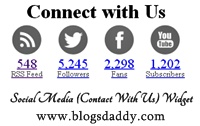
 Due to my exams I was not publishing articles. But, today I'm here with brand new social media widget for your Blogger/Blogspot or WordPress blog. This is unique connect with us widget with amazing social profile icons. It contains RSS, Facebook, Twitter and YouTube. Another main feature is that you can show counter for fans and followers below each button.
 But, you have to update these manually. In this tutorial I will tell you How to add Social Media (Contact With Us) widget to your Blogger/Blogspot or WordPress blogs.
Add Social Media Icons Widget To Blogger
- Go to Dashboard > Design > Page Elements.
- Click Add A Gadget. In New Window, Select HTML/Javascript .
- Copy The Code Given Below and Paste It Inside The Box.
- Save The Gadget and Its Done
Add Social Media Icons Widget To WordPress
- Go to Dashboard > Appearance > Widgets > Available Widgets
- Drag Text Widget Into a Sidebar.
- Paste In The Code.
- Save Widget & Its Done
Code For Social Media Icons Widget
<style>
.blogsdaddy_widget{
margin-bottom:20px;
overflow:hidden;
clear: both;
border: 0px solid black;
width: 340px;
}
.blogsdaddy_widget li{
line-height:15px;
float:left;
width:75px;
height:87px;
padding:7px 0 10px;
-moz-transition:.4s linear; -webkit-transition:.4s ease-out; transition:.4s linear;
list-style:none;
}
.blogsdaddy_widget li a{display:block;text-align:center;}
.blogsdaddy_widget li a strong{ background:url(https://blogger.googleusercontent.com/img/b/R29vZ2xl/AVvXsEhWszxSCmX0bw0NRyPBi4igG2qTaocL8YkV5oNbwPmpLBmGq4my3QFwfInWeij-pHLXYZ-uoJJArOT-loaK8BUTYLLJBEgZhWJMRGrveSOkmAIWdyZiu32HrVccVHb7I2s366swDIDU1laL/s1600/bd-icons.png) no-repeat;display:block; opacity:0.7; height:51px; margin-bottom:5px; -webkit-transition: opacity ease-in-out 0.4s; -moz-transition: opacity ease-in-out 0.4s; -o-transition: opacity ease-in-out 0.4s; transition: opacity ease-in-out 0.4s;}
.blogsdaddy_widget li a:hover strong{opacity:1;}
.blogsdaddy_widget li:hover a{text-decoration: none;}
.blogsdaddy_widget li.rss-subscribers a strong{ background-position:center -1084px ;}
.blogsdaddy_widget li.rss-subscribers a:hover strong{ background-position:center -1139px ;}
.blogsdaddy_widget li.rss-subscribers span{display:block;font-size:21px;}
.blogsdaddy_widget li.facebook-fans a strong { background-position:center -1192px ;}
.blogsdaddy_widget li.facebook-fans a:hover strong { background-position:center -1246px ;}
.blogsdaddy_widget li.twitter-followers a strong{ background-position:center -868px;}
.blogsdaddy_widget li.twitter-followers a:hover strong{ background-position:center -922px;}
.blogsdaddy_widget li.youtube-subs a strong{ background-position:center -976px;}
.blogsdaddy_widget li.youtube-subs a:hover strong{ background-position:center -1030px;}
.blogsdaddy_widget li span{display:block;font-size:21px;}
.blogsdaddy_widget li a small{color:#777;}
</style>
<br />
<div class="widget blogsdaddy_widget"style="margin-left:500px;">
<ul style="margin-left: -40px;">
<center><h1>Connect with Us</h1></center>
<li class="rss-subscribers">
<a href="http://feeds.feedburner.com/BlogsDaddy" target='_blank' rel='nofollow'>
<strong></strong>
<span>600</span>
<small>RSS Feed</small>
</a>
</li>
<li class="twitter-followers">
<a href="http://www.twitter.com/BlogsDaddy" target='_blank' rel='nofollow'>
<strong></strong>
<span>5,585</span>
<small>Followers</small>
</a>
</li>
<li class="facebook-fans">
<a href="http://facebook.com/BlogsDaddy" target='_blank' rel='nofollow'>
<strong></strong>
<span>2,398</span>
<small>Fans</small>
</a>
</li>
<li class="youtube-subs">
<a href="http://www.youtube.com/5abiRaag" target='_blank' rel='nofollow'>
<strong></strong>
<span>1,500</span>
<small>Subscribers</small>
</a>
</li>
</ul>
</div>
Remember Notes : The social and feed links are highlighted in red color, you need to change these to your own. Also replace yellow color counter with your own.
If you think this is really cool social icons widget then Do let me know via comments.! Join our conversation. Keep Blogging and Stay Blessed :)

Author - Gagan Masoun is the owner of Blogs Daddy Blog. Gagan lives in India, has been blogging since 2010 and writing Blogs Daddy Blog since 2011.You can follow him on twitter @BlogsDaddy. You can also follow him on Google+.


Thanks Mohammad :),
ReplyDeleteI will try to make this widget perfect for bloggers. Keep in touch for more widgets and tutorials. :)
Allah Bless You :)